Metadig: Forensic Metadata Analysis at Case Scale
Metadig runs ExifTool over whole evidence folders with reproducible hashes, file grouping, timelines and 428 triage rules. A complete user guide.
The problem
ExifTool is the reference tool for reading metadata, and most examiners already use it daily. Running it on a single file answers a single question. A real case rarely asks a single question: a seized laptop, a shared drive or a production set for disclosure can easily hold tens of thousands of images, office documents, PDFs, videos and shortcut files. Reading them one by one does not scale, and dumping everything to a single JSON or CSV only moves the problem. You end up with a table of hundreds of thousands of values and no structure to navigate it.
The more useful questions are relational. Which of these 3,000 photographs came from the same camera body? Which documents share a template, an author or a Microsoft 365 tenant? Which files carry identical metadata but different content, which suggests templating, batch processing or tampering? Which shortcut files point to the same removable volume? None of these is answered by reading files in isolation. They need the metadata of the whole set normalised into one model, then grouped, compared and plotted over time.
Then there is reproducibility. A hash of the full file proves the content has not changed. It says nothing on its own about whether your extraction of the metadata can be reproduced. If another examiner runs the same tool on a copy of the evidence in another folder, on another machine and in another time zone, do they get the same metadata? A naive dump says no. ExifTool’s output includes the file path, file-system timestamps and permissions, the ExifTool version, and some dates converted to the local time zone. None of these belong to the evidence itself. A metadata hash is only useful as a reference if it is computed over a canonical, documented representation that anyone can reproduce.
Finally, examiners are increasingly asked to triage content they must handle carefully: personal data under the GDPR, classification markings, export- controlled technical data. Triage at that scale needs rules, and rules need to be explicit, versioned and exported with their results.
Metadig was built to address these four points.
Metadig at a glance
Metadig is a Windows desktop application, written in Python with a PySide6 interface, that runs ExifTool in batches over a whole folder, recursively if required. It opens evidence read-only, makes no network connections, and writes nothing outside the output folder you choose. Each file gets two SHA-256 values: one over the full content, and one over a canonical serialisation of its metadata that excludes everything that depends on the file system or on ExifTool itself. The results are written to two semicolon- separated CSV files: one groups every tag and value combination with the list of files that carry it, and one holds one row per file.
On top of the extraction, Metadig groups files by identical content, identical metadata, tag values or rule keys, and plots the internal dates of the metadata on a timeline. A catalogue of 428 rules in 38 sets, covering forensics, personal data, classification markings, export control, AI content and European military aeronautics, flags metadata of interest. The rules use checksum validators, context words, derived group keys and normalised classification levels. Findings are exported with an exact copy of the rules that produced them and its hash. Metadig is a support tool for analysis and triage. It does not replace the examiner’s judgement, and its output should be verified before it is relied on.
| Capability | What it gives you |
|---|---|
| Batch extraction | ExifTool over a whole folder, recursive, read-only, long paths supported |
| Two SHA-256 per file | Full content, and a reproducible hash of the canonical metadata (profile metadig-hash/1) |
| Two CSV reports | Grouped metadata (tag + value → files) and metadata per file |
| Extraction options | Embedded and timed metadata (-ee) for DJI, GoPro and MISB; JPEG fingerprint (JPEGDigest, JPEGQualityEstimate) |
| Analysis tab | Grouping by identical files, identical metadata, tag values or rule keys; co-occurrence matrix; timeline of internal dates |
| Rules tab | 428 rules in 38 sets, validators, context words, group keys, classification levels, masking of personal data with a per-case HMAC, rule tester |
| Findings export | hallazgos.csv, the applied rules with their SHA-256, provenance record, optional classification marking |
| Interface languages | English, Spanish, French and German; reports are never translated |
The complete flow looks like this:
flowchart TD
  A[Source folder] --> B[ExifTool extraction<br>in batches]
  B --> C[SHA-256<br>of content]
  B --> D[Canonical<br>metadata JSON]
  D --> E[SHA-256<br>of metadata]
  C --> F[CSV reports]
  E --> F
  F --> G[Analysis tab<br>grouping and timeline]
  F --> H[Rules tab<br>apply catalogue]
  R[(Earlier<br>CSV reports)] -.->|Load analysis<br>from CSV| G
  H --> I[Findings table]
  I --> J[Export<br>hallazgos.csv, rules<br>and their SHA-256]
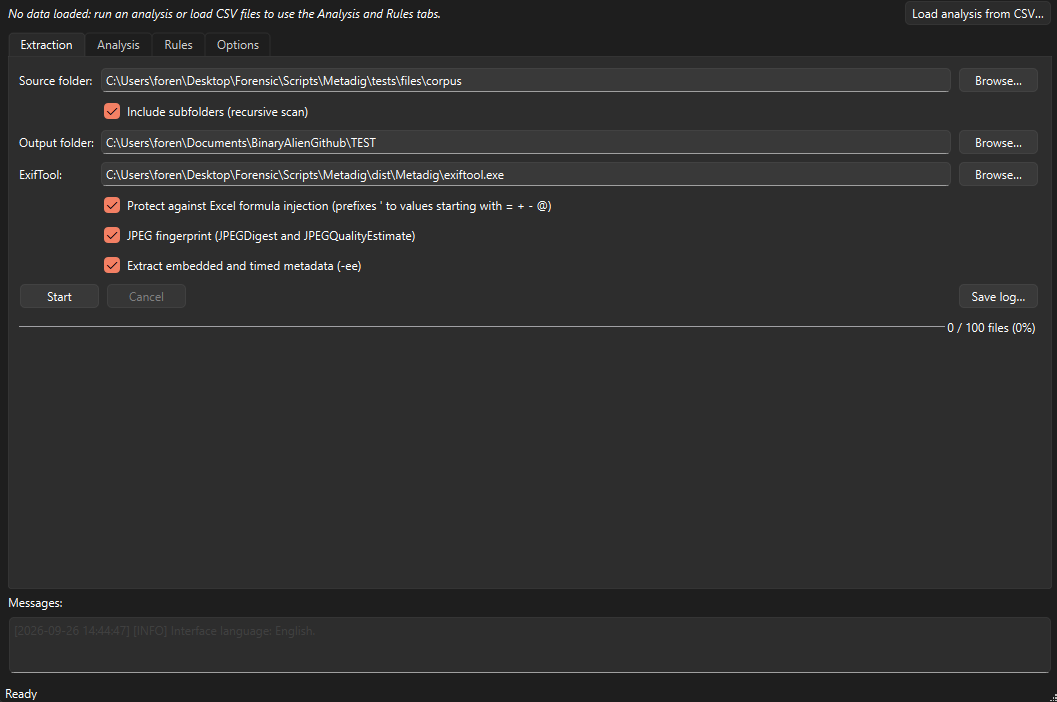 Figure 1: The Metadig main window.
Use cases
The scenarios below are fictitious. Names, serial numbers, identifiers and coordinates are invented for illustration.
Image authenticity
Scenario. A claimant submits 64 JPEG photographs of storm damage to a warehouse, all said to have been taken on the same afternoon with one phone.
How Metadig is used. Extract the folder with the JPEG fingerprint option on, then apply the forensic.software, forensic.tampering, forensic.temporal and forensic.jpeg sets. SW-02 (Desktop Image Editor) and SW-04 (Edit History) flag files processed in desktop editors and show the recorded history agent. SW-13 (Embedded Thumbnail after Edit) marks edited files that still carry an embedded thumbnail or preview, which may show the image before editing. TAM-07 (Thumbnail Mismatch) fires when the thumbnail’s aspect ratio differs from the main image, a common trace of cropping. TMP-01 (Modified Before Created), TMP-02 (Original differs from Digitized) and TMP-03 (EXIF vs XMP Date) flag incoherent dates. JPG-08 identifies re-encoded, JFIF-only files.
In the Analysis tab, grouping by identical metadata shows whether any photographs share byte-identical metadata while their content differs. The timeline shows whether the capture times really fall within one afternoon.
What you get. A short list of files to examine in depth: for example, 6 photographs edited in a desktop editor, 2 of them with a thumbnail whose aspect ratio does not match the main image. Metadig does not extract the thumbnail itself; you extract and compare it with your usual tools.
Device attribution
Scenario. Photographs and videos from a harassment case are spread across four seized devices and a cloud export. The question is which of them came from the same camera, phone or drone.
How Metadig is used. Extract everything in one run with the JPEG fingerprint on, and with -ee if drone footage is present. In the Rules tab, DEV-02 (Body Serial Number) groups files by camera serial number, and DRN-02 (Drone Serial Number) does the same for DJI aircraft. SMP-03 (Apple Boot Session) derives the boot time of an iPhone from capture time minus the runtime clock. Photographs with the same boot key, within a configurable tolerance, were taken between the same two restarts of the same phone. JPG-01 (Quantization Table Digest) groups JPEGs by encoder signature, which separates a camera model’s native output from files re-saved by software.
In the Analysis tab, By rule mode groups files by the keys of the selected rules, and the co-occurrence matrix shows how many files carry findings of each pair of rules.
What you get. Groups such as “serial FX-00417: 212 files” or “boot session 2026-03-02 07:14 (±5 s): 38 files across two devices”. The second kind is an investigative lead, not an identification. Boot-session keys and quantisation digests narrow a population; they do not prove a single source on their own.
Document provenance and leaks
Scenario. A confidential board memo appears on a public forum as a PDF. The organisation holds 9,000 candidate Word and PDF files from its file servers.
How Metadig is used. Apply forensic.office, forensic.pdf, forensic.network, labels.msip and pii.generic. PII-01 (Author / Creator Identity), PII-02 (Last Editor) and PII-03 (Author differs from Last Editor) reconstruct hand-off chains. OFF-04 (Document Template) and OFF-01 (Organization) link documents to a template or company field. PII-04 (Username in Path) finds Windows profile names inside embedded paths. MIP-02 (Label Name) and MIP-03 (Source Tenant) read Microsoft Purview sensitivity label properties, including the tenant ID of the labelling organisation. PDF-04 (Online PDF Service) flags producers such as online conversion services, which suggest the file passed through a third party. NET-04 flags SharePoint and OneDrive locations.
What you get. Grouping by tag value on XMP-xmpMM:DocumentID or XMP-xmpMM:OriginalDocumentID can tie the leaked PDF to its source document. The rule findings add the template, the last editor and a tenant such as 00000000-0000-4000-8000-00000000c0de. Usernames found by PII-04 are personal data: they are masked in the table, and their group key is a case-specific HMAC.
USB exfiltration from LNK files
Scenario. An employee is suspected of copying design files to a USB drive before resigning. The collection includes the user profile’s Recent folder, with several hundred .lnk files.
How Metadig is used. ExifTool parses Windows shortcut files, so Metadig extracts them like any other file. The forensic.windows set covers them. WIN-04 (Removable Media Access) fires when the shortcut’s DriveType is removable media and groups by the volume serial number. WIN-02 (LNK Volume Serial) and WIN-03 (LNK Volume Label) record the volume identity, WIN-06 (LNK Target Path) groups targets by their first path segments, and WIN-01 (LNK Origin Machine) records the NetBIOS name of the machine where the shortcut was created.
In the Analysis tab, By rule mode on WIN-04 lists every shortcut pointing to each removable volume. The timeline plots the target timestamps that ExifTool reads from the shortcut header.
What you get. For example, 41 shortcuts pointing to a removable volume with serial 0000-7E21 and label BACKUP_EXT, with targets under a design folder and dates concentrated in the two weeks before the resignation. This is a lead to correlate with registry, event log and USB device history, which Metadig does not analyse.
Personal data audit before disclosure
Scenario. A public body must release 2,500 documents and images in response to an access request. Before release, the metadata has to be checked for personal data that the redaction of visible content would miss.
How Metadig is used. Apply the eight pii.* sets. The country sets recognise national identifiers with checksum validators: Spanish DNI and NIE (mod 23), IBANs (mod 97), French NIR, German tax IDs, UK NHS numbers. Invalid check digits are discarded, which cuts false positives. pii.people reads face regions and person tags written by photo managers. pii.special_categories flags terms related to health, religion, trade unions and the other Article 9 GDPR categories. Those rules are marked as low-precision triage signals.
Sensitive rules mask values in the table (only the last four characters stay visible), and their group keys are computed as an HMAC with the case key. Two documents with the same identifier fall into the same group without the identifier being displayed.
What you get. A findings table per file and rule, and a masked hallazgos.csv that can be handed to the redaction team. Examples: 17 files whose XMP-dc:Creator holds a staff member’s name, 4 files with face regions naming people, 2 files with a DNI in a custom property. Metadata only: text in the document body is not examined.
Defence supply chain triage
Scenario. A tier-2 supplier receives a data room of 12,000 technical documents from several European partners and needs to identify material that must be handled on an accredited system or under export licence before it is opened more widely.
How Metadig is used. Apply export.control, the five classification sets (mil.class.uk/es/fr/de/nato_eu), labels.msip, classification.other and the mil.aero.* sets. EXP-01 (Control List Code) recognises ECCN and EU dual-use codes and derives the category, product group and control regime as a secondary key. The classification rules normalise national markings to a common level from 0 to 4. TDA-01 (S1000D Data Module Code) and TDA-04 (NATO Stock Number) identify technical data. MIP-02 reads sensitivity label names.
What you get. A per-file maximum level and country, such as 3|ES or 2|NATO, with a mixed_markings flag when markings from several countries coexist. The export warns that the results must be kept on a system accredited for the highest level found and proposes a marking for the export. This is triage. The classification of a document is determined by its originator and the competent security authority, not by a metadata rule.
AI-generated content
Scenario. A newsroom receives 300 images purportedly taken at a protest and wants to know which ones declare, or betray, generative origin before verification begins.
How Metadig is used. The ai.content set covers declared and incidental signals. AI-01 (IPTC Digital Source Type) reads the IPTC value and groups by its last URI segment, such as trainedAlgorithmicMedia. AI-04 (C2PA Manifest Present) detects the JUMBF container of a C2PA manifest, and AI-05 to AI-07 read its claim generator, software agent and action type. AI-08 to AI-12 recognise AUTOMATIC1111/Forge generation parameters, checkpoint hashes, model names, seeds and LoRA usage in PNG text chunks. AI-14 to AI-16 read Midjourney job IDs, account traces and version parameters.
What you get. For example, 11 images with generation parameters (grouped by checkpoint hash, which links images produced with the same model), 3 with a C2PA manifest, and 1 with a Midjourney job ID. The absence of these signals proves nothing: social platforms and messaging apps routinely strip metadata, and forensic.social rules such as SOC-03 (Platform-stripped) and SOC-04 (Messaging App Re-encode) help identify files that went through that path.
Using Metadig
Requirements and installation
Metadig runs on Windows. It needs ExifTool; the packaged build includes it.
Packaged build. Download the package and extract it. Copy the whole Metadig folder, not only Metadig.exe. The folder must contain:
Metadig.exe_internal\exiftool.exeandexiftool_files\rulesets\(the rule catalogue, kept outside the executable so it can be reviewed and updated without rebuilding)
Python does not need to be installed. If Windows Smart App Control or App Control for Business blocks an unsigned executable, your administrator must allow the publisher, or you can run from source.
From source. Clone or download the source code. You need Python 3.11 or later.
1
2
3
4
python -m venv .venv
.\.venv\Scripts\Activate.ps1
pip install -r requirements.txt
python main.py
Then install ExifTool. Download the Windows executable package from exiftool.org, rename exiftool(-k).exe to exiftool.exe (the -k variant waits for a key press and cannot be driven by another program), and keep it together with its exiftool_files folder. Metadig finds it next to main.py or Metadig.exe, in a subfolder named exiftool*, or on the PATH. You can also enter its path by hand.
To build the executable yourself, the repository includes a PowerShell script that uses the project’s virtual environment:
1
2
pip install -r requirements-dev.txt
powershell -ExecutionPolicy Bypass -File .\build.ps1
The result is in dist\Metadig\. Always run the executable from there, not from the intermediate build\ folder.
Interface overview
The window has four tabs and a Messages panel shared by all of them.
| Tab | Purpose |
|---|---|
| Extraction | Source and output folders, ExifTool path, extraction options, start and cancel |
| Analysis | Two sub-tabs: File grouping and Timeline |
| Rules | Rule browser, rule application, findings, summary by rule, rule tester, export |
| Options | Case configuration (thresholds, HMAC key, bounding boxes, case window) and interface language |
A bar at the top shows which data set is loaded. The Load analysis from CSV… button next to it reopens an earlier extraction without scanning again. The Messages panel lists information, warnings and errors: locked files, files ExifTool cannot process, skipped links, the ExifTool version, rule dependencies and every unlock of a masked value. Save log… writes it to a text file for your case notes.
Selecting a file in any view opens its complete metadata in a side panel with a filter box. Files and tags flagged by rules are coloured by risk in every view.
The interface is available in English, Spanish, French and German, and can be switched in the Options tab without restarting. Reports, CSV column names and rule content are never translated, so results from analysts working in different languages stay identical and comparable. CSV column names are in Spanish; the tables in Output files give their meaning.
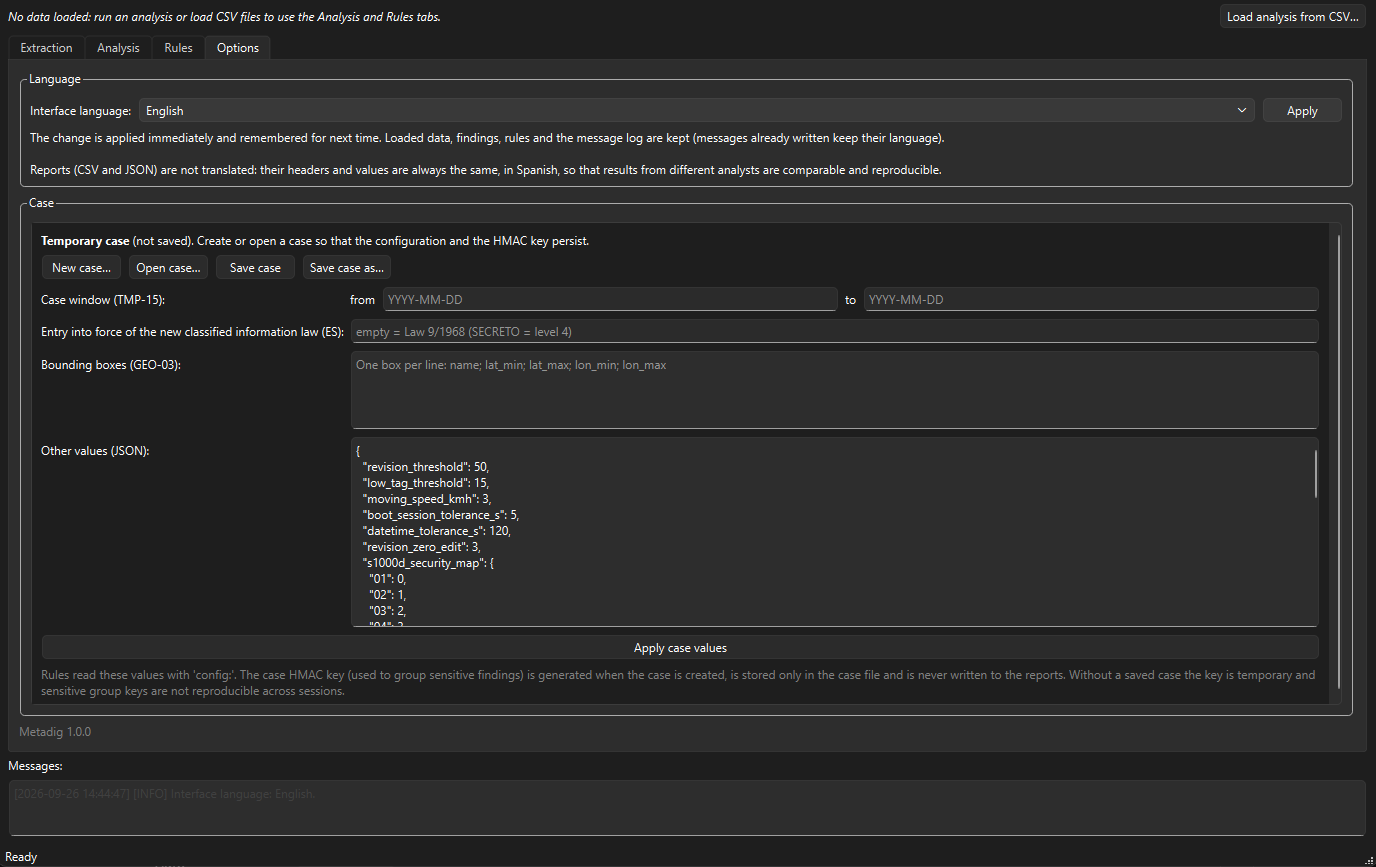 Figure 2: Case configuration and interface language in the Options tab.
Running an extraction
In the Extraction tab, choose the source folder and the output folder, tick Include subfolders for a recursive scan, and click Start.
| Option | Default | Effect |
|---|---|---|
| Include subfolders | Off | Recursive scan. Symbolic links and junctions are never followed, so the scan cannot leave the evidence. |
| ExifTool | Auto-detected | Path to exiftool.exe. |
| Protect against Excel formula injection | On | Cells that start with =, +, -, @, tab or carriage return get a leading ', so a crafted value such as =HYPERLINK(...) does not execute when the CSV is opened in Excel. Hashes are always computed on the original values. |
| JPEG fingerprint | On | Adds -api RequestTags=JPEGDigest,JPEGQualityEstimate. ExifTool identifies the encoder (camera model or software) from the quantisation tables and estimates the quality. |
| Extract embedded and timed metadata (-ee) | Off | Needed for DJI, GoPro and MISB (STANAG 4609) telemetry. Runs as a separate pass over video files only. It can be slow with long videos, and Metadig asks for confirmation. |
Tags obtained through the last two options, and ExifTool’s own warnings and errors, do not enter the metadata hash or the two main CSV files. They are written to metadatos_adicionales.csv and are available to the rule engine. The metadata hash is therefore the same whether or not those options were used.
The extraction runs in the background, so the window stays responsive. The progress bar advances file by file. Errors on individual files, such as a locked file or an unreadable path, are logged in the Messages panel without stopping the run. Cancel stops the extraction and writes no reports, so a cancelled run never leaves partial results. Paths longer than 260 characters are supported, even when the Windows long-paths setting is disabled. Metadig warns you if the output folder is inside the source folder.
When the extraction finishes, the data is loaded into the Analysis and Rules tabs automatically.
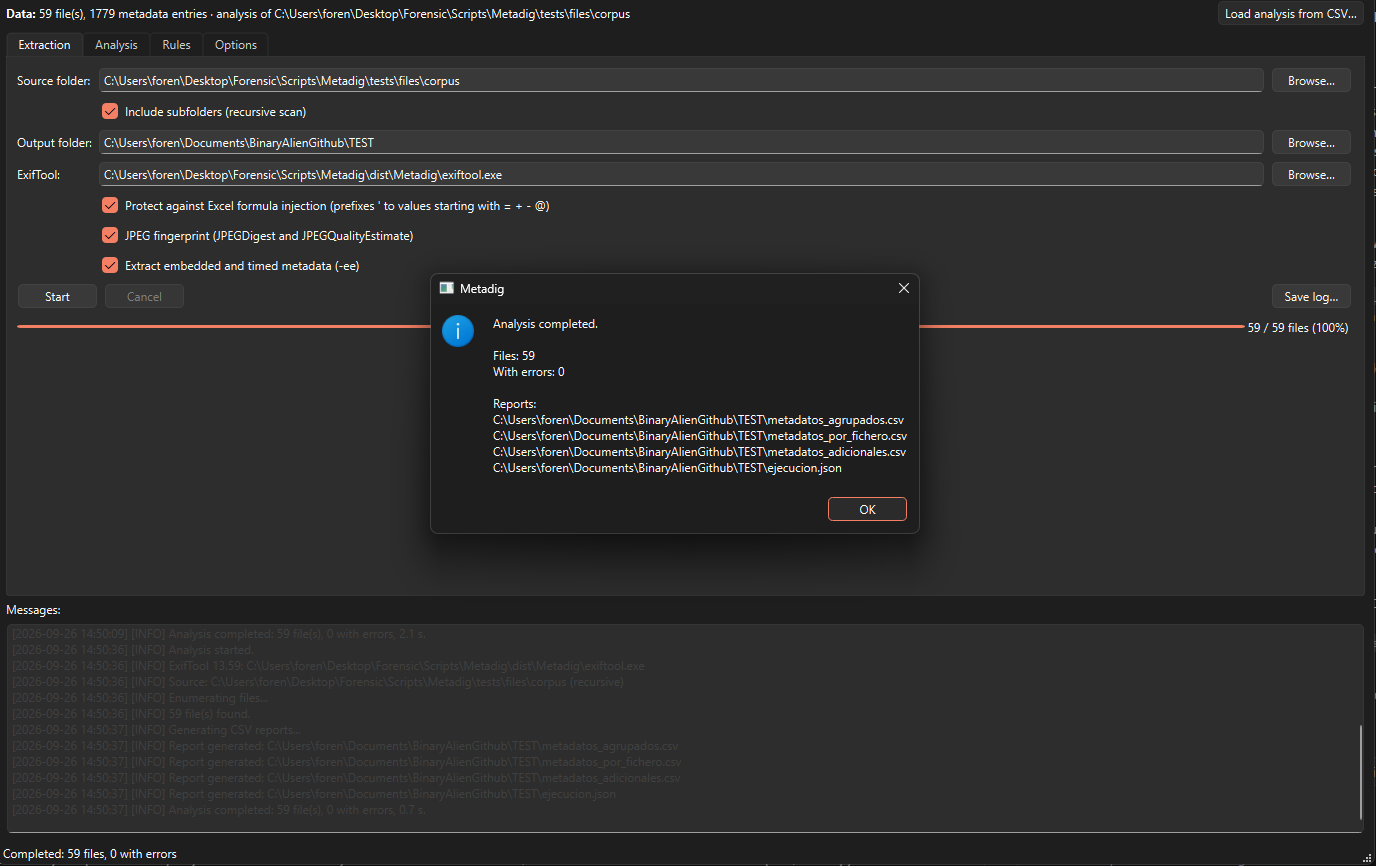 Figure 3: A finished extraction, with the run logged in the Messages panel.
Evidence is opened read-only and ExifTool runs without any write option. Reading a file may still update its last-access timestamp if that feature is enabled on the volume. For original evidence, use a write blocker or work on a verified copy.
Output files
All CSV files are UTF-8 with BOM, semicolon-separated and CRLF-terminated. Excel opens them directly with European regional settings. With other settings, use Data → From Text/CSV and choose ;.
metadatos_agrupados.csv (grouped metadata). One row per unique combination of group, tag and value, sorted by the number of files in descending order. It answers “which files share this exact value?” and is the fastest way to spot outliers: a software version that appears in only three files, or an author name shared by files that should be unrelated.
| Column | Meaning |
|---|---|
Grupo | ExifTool family-1 group (IFD0, ExifIFD, XMP-dc, PDF…) |
Etiqueta | Tag name |
Valor | Value; lists are joined with , |
NumFicheros | Number of files with this exact value |
Ficheros | Relative paths of those files, separated by | |
metadatos_por_fichero.csv (metadata per file). One row per file. It is the complete matrix of the extraction and the file Metadig reads back when you load an earlier analysis.
| Column | Meaning |
|---|---|
RutaRelativa | Path relative to the source folder |
NombreFichero | File name |
SHA256_Fichero | SHA-256 of the full content; empty if the file could not be read |
SHA256_Metadatos | SHA-256 of the canonical metadata; empty if ExifTool returned nothing |
NumEtiquetas | Number of tags |
one column per Group:Tag | Every tag found in the whole set, in alphabetical order; empty when the file does not have it |
ExifTool runs with -G1, so group names are specific: IFD0:Model, ExifIFD:DateTimeOriginal, XMP-xmpMM:DocumentID, PDF:Author. Binary values are kept as ExifTool summarises them ((Binary data 12345 bytes, use -b option to extract)); their content is not extracted. If a report exceeds Excel’s limits on columns, rows or cell length, Metadig warns you. The CSV still contains everything.
Two further files complete the extraction. metadatos_adicionales.csv holds the tags kept for the rule engine but excluded from the hash, with the columns RutaRelativa;Grupo:Etiqueta;Valor;Origen. Origen is exiftool_message, request_tags or ee. It is only written when there is at least one such tag. ejecucion.json is the provenance record of the extraction: the hash profile and its exact definition, the ExifTool version and arguments, the options used, the UTC date and the number of files.
Hashing and reproducibility
SHA256_Fichero is the standard SHA-256 of the file content, read in chunks. It matches any other tool:
1
2
Get-FileHash -Algorithm SHA256 .\evidence.jpg
certutil -hashfile .\evidence.jpg SHA256
SHA256_Metadatos is computed over a canonical representation of the metadata, defined as hash profile metadig-hash/1. The aim is that the same evidence produces the same value on another computer, in another folder and in another time zone, provided the same ExifTool version is used. ExifTool versions can change how tags are decoded, which is why the version is recorded in the log and in ejecucion.json.
flowchart TD
  F[Evidence file] --> R[Read-only<br>chunked read]
  R --> H1[SHA256_Fichero]
  F --> X[ExifTool -j -G1 -a -u<br>with TZ=UTC]
  X --> P[Parse JSON<br>numbers as text]
  P --> FL{Filter}
  FL --> D1[Discarded<br>path, System:*,<br>ExifTool:*]
  FL --> A1[metadatos_<br>adicionales.csv<br>warnings, JPEG<br>fingerprint, -ee]
  FL --> C[Canonical JSON<br>everything else]
  C --> H2[SHA256_Metadatos]
  C --> CSV[Main CSV reports]
What is excluded, and why:
| Excluded | Reason |
|---|---|
SourceFile | The path as passed to ExifTool; changes with every copy |
System:* | File-system data: directory, file name, size string, dates, permissions |
ExifTool:* | ExifTool version and messages; depend on the tool, not the evidence |
JPEGDigest, JPEGQualityEstimate | Only exist when requested with RequestTags; excluding them keeps the hash independent of that option |
Tags from -ee | Extracted in a separate pass that never enters the hash |
ExifTool also runs with TZ=UTC, because a few tags (for example the PE timestamp of executables) are converted to local time. A file with no metadata left after filtering serialises as {} and always gets the hash 44136fa355b3678a1146ad16f7e8649e94fb4fc21fe77e8310c060f61caaff8a.
Verifying a metadata hash independently. The method is specified in the header of metadig/hashing.py. It can be reproduced without Metadig: run ExifTool with the exact arguments and TZ=UTC, parse the JSON keeping numbers as their literal text, rename repeated keys, filter, serialise and hash. The following standalone script does exactly that:
1
2
3
4
5
6
7
8
9
10
11
12
13
14
15
16
17
18
19
20
21
22
23
24
25
26
27
28
29
30
31
32
33
34
35
36
37
38
39
40
41
42
"""Independent re-implementation of the Metadig metadata hash (metadig-hash/1)."""
import hashlib
import json
import os
import subprocess
import sys

EXCLUDED_GROUPS = {"System", "ExifTool"}
REQUEST_TAGS = {"JPEGDigest", "JPEGQualityEstimate"}


def unique_keys(pairs):
    # Repeated keys (possible with -a): "Key", "Key (2)", "Key (3)"...
    out = {}
    for key, value in pairs:
        if key in out:
            n = 2
            while f"{key} ({n})" in out:
                n += 1
            key = f"{key} ({n})"
        out[key] = value
    return out


def metadata_hash(exiftool, path):
    env = dict(os.environ, TZ="UTC")
    raw = subprocess.run(
        [exiftool, "-config", "", "-j", "-G1", "-a", "-u", "-charset", "filename=utf8",
         "-api", "WindowsLongPath=1", path],
        capture_output=True, env=env, check=True).stdout.decode("utf-8")
    record = json.loads(raw, parse_int=str, parse_float=str, parse_constant=str,
                        object_pairs_hook=unique_keys)[0]
    kept = {k: v for k, v in record.items()
            if k != "SourceFile"
            and k.partition(":")[0] not in EXCLUDED_GROUPS
            and k.partition(":")[2] not in REQUEST_TAGS}
    canonical = json.dumps(kept, sort_keys=True, separators=(",", ":"), ensure_ascii=False)
    return hashlib.sha256(canonical.encode("utf-8", "surrogatepass")).hexdigest()


if __name__ == "__main__":
    print(metadata_hash(sys.argv[1], sys.argv[2]))
1
python verify_meta_hash.py C:\Tools\exiftool.exe D:\Case42\evidence\IMG_0001.jpg
Pass absolute paths. When running Metadig from source, a bundled helper prints both hashes and, with --show-json, the canonical JSON the metadata hash is computed on:
1
python -m metadig.verify --show-json --exiftool C:\Tools\exiftool.exe D:\Case42\evidence\IMG_0001.jpg
The Analysis tab
The Analysis tab works on the data currently loaded, either from a finished extraction or from Load analysis from CSV…. That button opens a metadatos_por_fichero.csv produced earlier. If metadatos_agrupados.csv is in the same folder, it is used to recover tags with empty values and to check that both reports come from the same analysis. metadatos_adicionales.csv and ejecucion.json are also read when present. Hashes are shown as stored, not recalculated.
File grouping
The File grouping sub-tab shows a tree of groups and their files. Only groups with two or more files are shown by default; tick Also show single-file groups to see all of them. Files whose hash is empty are not grouped.
| Mode | Groups files by | Typical use |
|---|---|---|
| Identical files | Same SHA256_Fichero | Duplicates |
| Identical metadata | Same SHA256_Metadatos | Different content with identical metadata: copying, templating, batch processing or tampering. The Note column says whether the content is also identical or how many content versions exist. |
| By tag value(s) | The combination of values of one or more tags chosen from a searchable list, such as IFD0:Model + ExifIFD:SerialNumber | Same camera, same author, same document ID. Missing tags show as (no value). |
| By rule | The group key each selected rule produced; with several rules, either the combination of keys or each rule separately | Linking files that share a device, account, place or author as defined by the rules. Requires rules to have been applied. |
In By rule mode, a co-occurrence matrix shows in how many files each pair of selected rules has findings together. It is a quick way to see, for instance, that nearly every file with a desktop editor signature also has a stripped maker-notes finding.
Export grouping to CSV… saves the visible groups, one file per row, with the columns Grupo;Nota;NumFicheros;RutaRelativa;NombreFichero;SHA256_Fichero;SHA256_Metadatos.
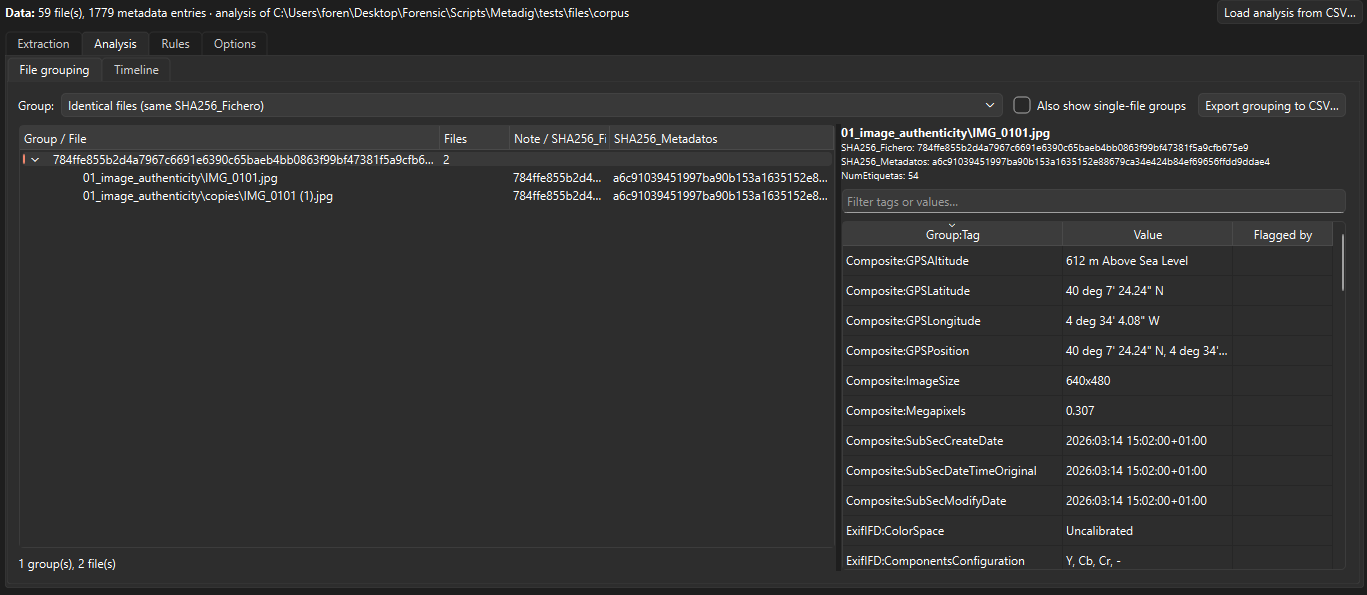 Figure 4: Grouping by identical content.
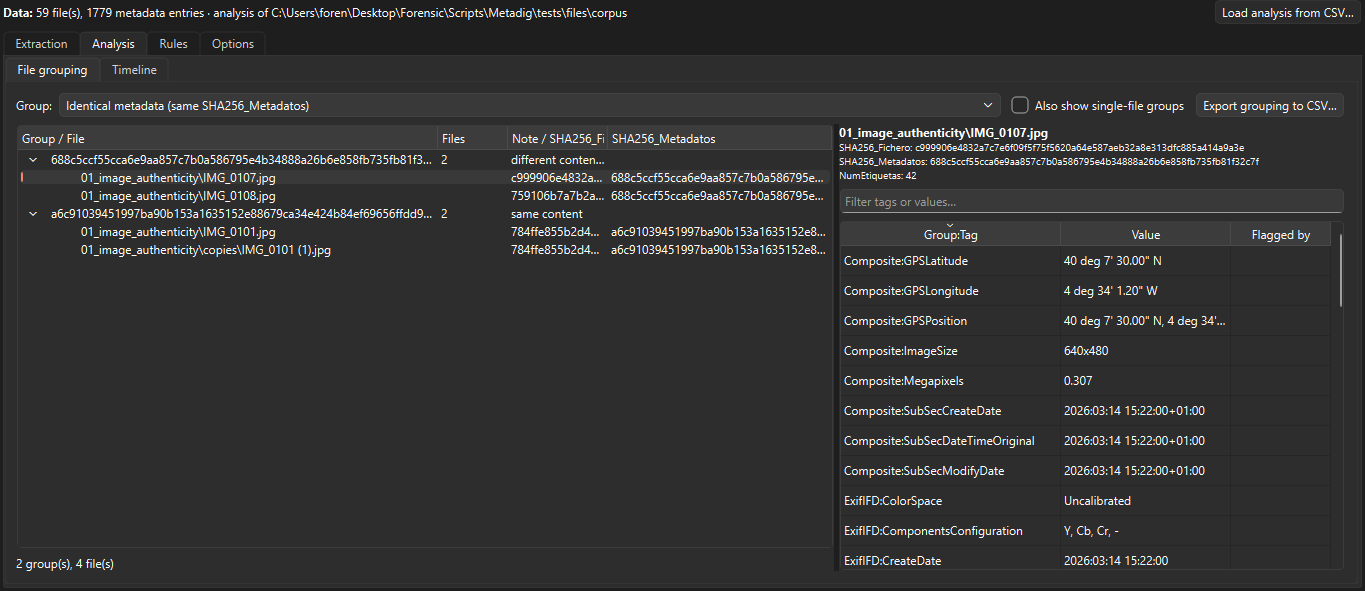 Figure 5: Identical metadata with different content.
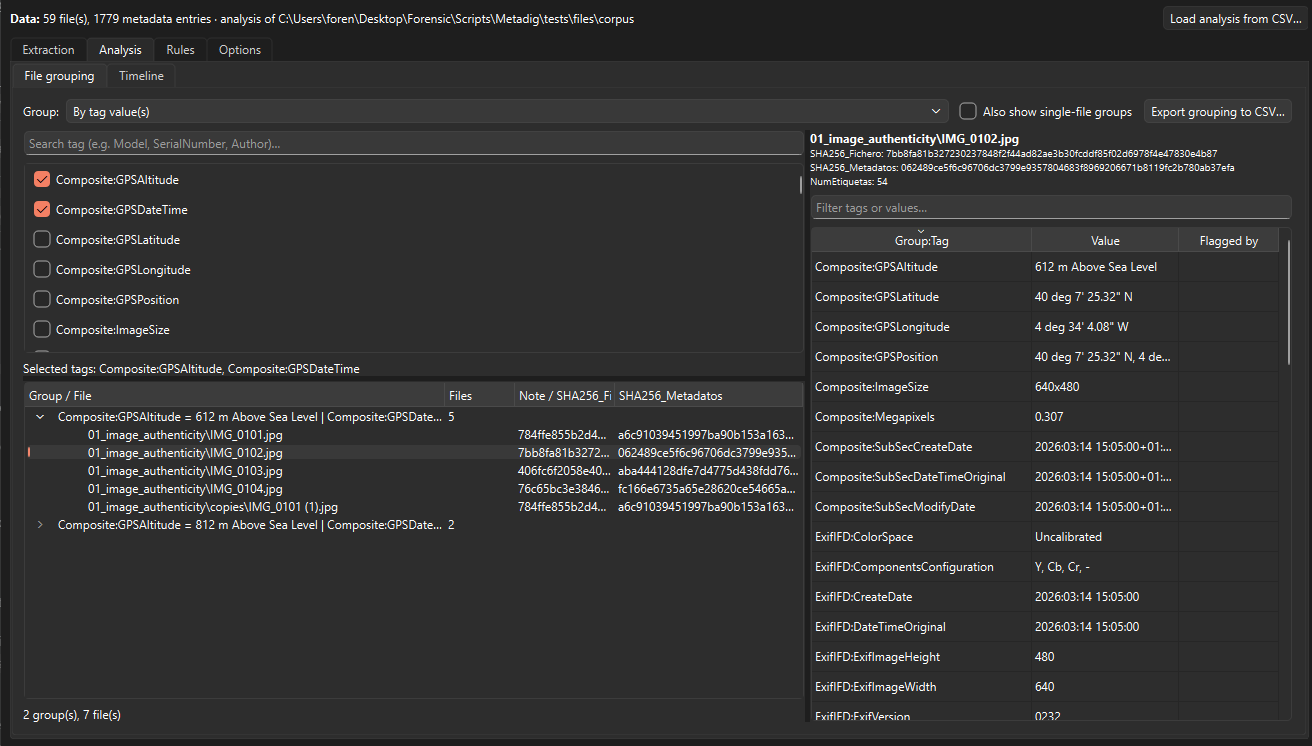 Figure 6: Grouping by the combination of two tag values.
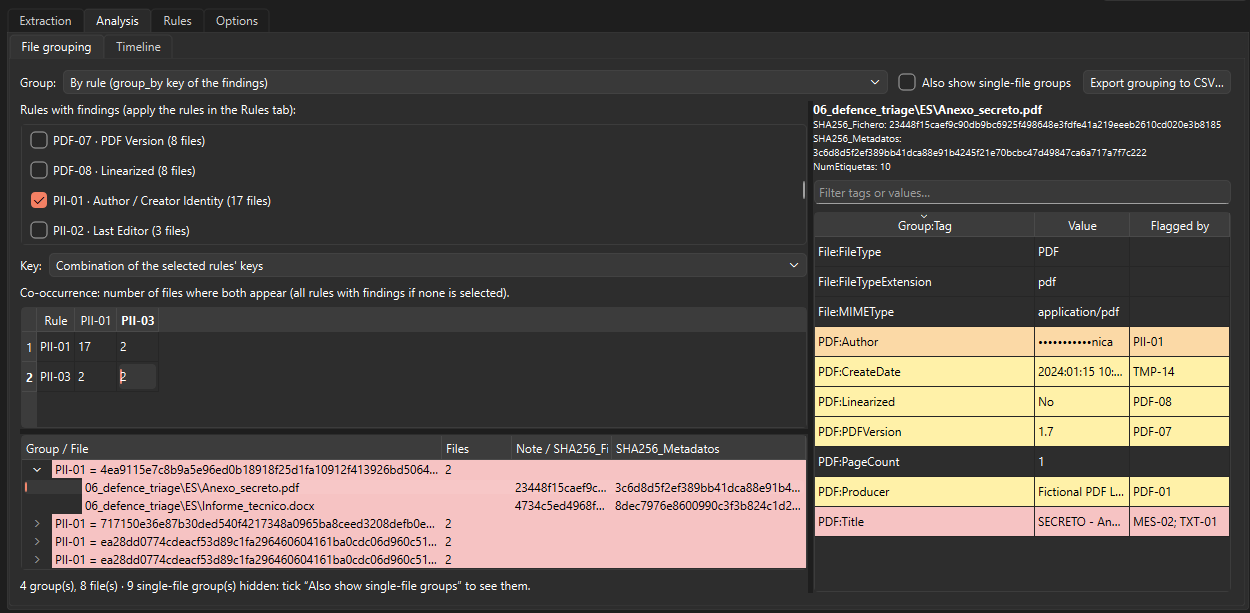 Figure 7: Grouping by rule keys and the co-occurrence matrix.
Timeline
The Timeline sub-tab plots the internal dates found in the metadata. File-system dates are excluded at extraction, so they never appear here.
Metadig lists every tag whose name contains Date or Time and that has at least one value in date format, with counts of valid and invalid values; tick the tags you want plotted. Accepted formats are ExifTool’s YYYY:MM:DD HH:MM:SS[.ss][Z|±HH:MM], a date alone, and the ISO variants. Placeholders such as 0000:00:00 00:00:00 or month 13 are excluded, and the warning above the chart says how many.
Dates with and without a time zone are never mixed silently. Dates with a zone are drawn as filled markers, dates without one as hollow markers labelled “no time zone”. Time: Recorded time plots every date as recorded; Time: UTC converts only the dates that carry a zone. A warning appears whenever both kinds are shown, and the Time zone filter restricts the view to one kind.
The Y axis can show events by date tag or by file. The toolbar zooms and pans. Select range filters the events table to the area you drag over the chart, and clicking a point opens that file’s metadata. Files flagged by rules are drawn in the colour of their highest severity. A histogram by day, month or year shares the time axis. Export events to CSV… saves the events in the table, respecting the selected range, with the columns RutaRelativa;Grupo:Etiqueta;ValorOriginal;FechaHora;ZonaHoraria;FechaHoraUTC;EjeGrafico. Export chart to PNG… saves the chart as shown.
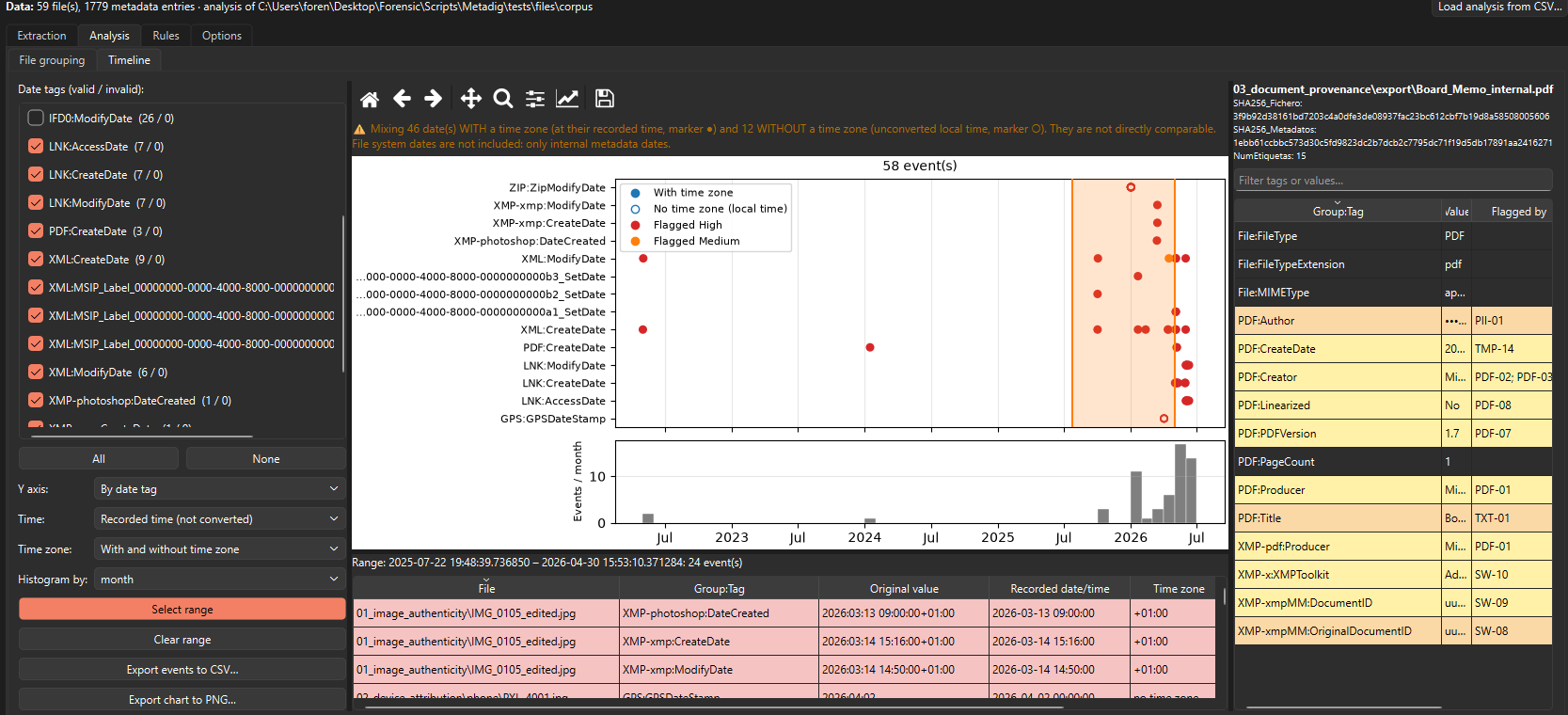 Figure 8: Timeline of internal dates, with and without time zone.
The Rules tab
The Rules tab applies the rule catalogue shipped in the rulesets\ folder, one JSON file per set. The left side is the rule browser. It groups rules by domain and set, with checkboxes at every level, filters by text, risk, level and country, and buttons to activate or deactivate the visible rules, load a rule set, create a user rule and reload the catalogue. A Verify column marks rules whose tag names still have to be confirmed with real files. Apply rules runs in the background with per-file progress and Cancel. The developer measured about 6.6 ms per file with all 428 rules active on files of around 50 tags.
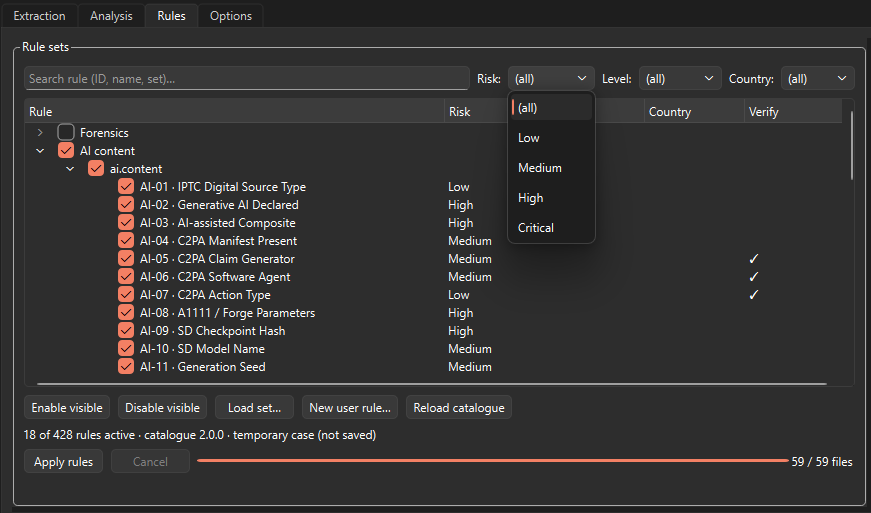 Figure 9: The rule browser.
Anatomy of a rule
A rule is a JSON object. The two rules below are taken from the catalogue. MES-04 flags the Spanish marking CONFIDENCIAL only when context words appear nearby or in the document’s classification-related properties, and assigns it level 2. ES-10 finds Spanish IBANs, discards those with a wrong mod-97 check, masks them as personal data and derives the bank code as a secondary key.
1
2
3
4
5
6
7
8
9
10
11
12
13
14
15
16
17
{
  "id": "MES-04",
  "name": "Confidencial",
  "set": "mil.class.es",
  "condition": { "op": "regex", "tags": "*", "p": "\\bCONFIDENCIAL\\b" },
  "context": {
    "p": "CLASIFICACI[OÓ]N|clasificad|Ministerio de Defensa|\\bONS\\b",
    "window": 80,
    "tags": ["custom_properties", "*:Title", "*:Subject", "*:Category", "*:Status"]
  },
  "case_sensitive": true,
  "group_by": "classification_level",
  "level": 2,
  "risk": "high",
  "conf": "high",
  "country": "ES"
}
1
2
3
4
5
6
7
8
9
10
11
12
13
{
  "id": "ES-10",
  "name": "Spanish IBAN",
  "set": "pii.es",
  "condition": { "op": "regex", "tags": "*", "p": "\\bES\\d{2}(\\s?\\d{4}){5}\\b" },
  "validators": ["mod97_iban"],
  "group_by": "value",
  "secondary_group_by": "iban_bank_code",
  "risk": "high",
  "conf": "high",
  "country": "ES",
  "sensitive": true
}
The main fields are summarised below.
| Field | Role |
|---|---|
condition | A tree of conditions combined with all, any and not. Leaf types include exists, regex, tag_name_regex, equals, contains, compare (numbers, dates, case values), cross (two tags compared with each other), group_exists, bbox, file_type, rule_match and named custom functions. |
tags (scope) | A list of tags with wildcards (*:Make, *MSIP*Name), * for all text values minus global exclusions, or named scopes: free_text, free_text+path, custom_properties. |
context | Words that must appear within window characters of the match, in named tags, or anywhere in the file’s free text. |
validators | Checksums and sanity checks that must pass: mod23_dni, mod97_iban, luhn, mod11_nhs, elster_steuerid, mrz_check, not_datetime and others. |
group_by, secondary_group_by | Expressions that derive a group key from the hit: value, capture(1) | normalized, geohash(6), email_domain, eccn_category, apple_boot_session… |
risk, conf | Impact (low to critical) and precision (low to high). |
level, lvl_map | Classification level 0–4, derived from the marking found, or a mapping table from the case configuration. |
sensitive, verify, country | Masking of personal data, tag names pending confirmation, country of the identifier or marking. |
requires, supersedes, yields_to | Dependencies and priority between rules. |
Evaluation follows the same path for every hit:
flowchart TD
  S[Tags in scope] --> C{Condition?}
  C -->|match| V{Validators?}
  V -->|pass| X{Context?}
  C -->|no| N[No finding]
  V -->|fail| N
  X -->|missing| N
  X -->|found| K[Group keys, level<br>and rule priority]
  K --> M{Sensitive?}
  M -->|yes| MM[Mask value<br>HMAC group key]
  M -->|no| F[Finding]
  MM --> F
Rules that an active rule depends on are evaluated in the background even when their set is inactive; they do not produce visible findings. Missing dependencies and rules that cannot be evaluated are reported in the Messages panel. Dates are compared in UTC when a zone is known; otherwise local times are compared and the finding is flagged tz_unknown. Conditions that compare tags never fire when a tag is absent.
A few virtual fields are available to rules alongside the real tags: Path:RelativePath, Path:FileName, Path:Extension, Stats:NumTags, Analysis:Date (the date rules are applied) and Doc:Date (the oldest valid original or creation date of the file).
The catalogue by domain
| Domain | Sets | Rules | What it detects |
|---|---|---|---|
| Forensics | 16 | 180 | Geolocation, devices, smartphones, drones and ISR, editing software, JPEG structure, Office, PDF, Windows artefacts, network traces, video and audio, temporal anomalies, tampering, copyright, free text, social platforms |
| AI content | 1 | 18 | IPTC digital source type, C2PA manifests, Stable Diffusion and ComfyUI parameters, Midjourney traces |
| Sensitivity labels | 1 | 10 | Microsoft Purview (MSIP) labels: name, tenant, method, dates, visual markings |
| Export control | 1 | 16 | ECCN and EU dual-use codes, EAR99, ITAR/USML, national military lists, licences, sanctioned destinations |
| Other markings | 1 | 7 | US markings and banners, dissemination caveats, corporate sensitivity, legal privilege, TLP, PAP |
| Personal data | 8 | 112 | People in images, generic identifiers, Spain, France, Germany, United Kingdom, GDPR Article 9 categories, financial and HR documents |
| Classification markings | 5 | 44 | United Kingdom, Spain, France, Germany, NATO and EU |
| European military aeronautics | 5 | 41 | Programmes, EMAR/PERAM airworthiness, S1000D and NATO codification, aircraft identifiers, industrial security |
| Total | 38 | 428 |
In the rule browser, Other markings (classification.other) appears under the Classification domain together with the five national sets.
Forensics. GEO-02 (Location Cluster) groups files by a six-character geohash, a cell of roughly 1.2 × 0.6 km, so photographs taken in the same area fall into the same group. TMP-04 (GPS vs Camera Clock) derives the offset between the GPS timestamp and the camera clock, which reveals the real time zone or clock drift. OFF-06 (Edit Time Inconsistency) flags Office documents whose recorded editing time exceeds the interval between creation and last modification.
AI content. AI-02 (Generative AI Declared) fires when the IPTC digital source type declares trained algorithmic media. AI-09 (SD Checkpoint Hash) groups Stable Diffusion images by the model checkpoint. AI-13 (ComfyUI Workflow) detects an embedded ComfyUI prompt or workflow and groups by the checkpoint named in it.
Sensitivity labels. MIP-01 (Sensitivity Label Present) finds an enabled Purview label. MIP-04 (Labeling Method) distinguishes a label chosen by the user (Privileged) from a default or automatic one (Standard). TMP-12 (Label Before Creation), in the temporal set, flags a label date earlier than the document’s creation date, excluding documents created from a labelled template. Label names are defined by each organisation, so MIP-02 (Label Name) assigns a classification level only when the name is a distinctive national or NATO marking, such as “OFFICIAL-SENSITIVE”, or when the analyst has mapped it in the case configuration. Default names such as “Confidential” get no level.
Export control. EXP-01 (Control List Code) recognises control list codes and derives the category, product group and regime. EXP-12 (Sanctioned Destination) matches destinations against a list kept in the case configuration. EXP-13 (Sensitive Technology Keyword) matches technology terms per category.
Other markings. CLS-05 (Traffic Light Protocol) and CLS-06 (Permissible Actions Protocol) read TLP and PAP labels. CLS-04 (Legal Privilege) flags attorney-client and professional-secrecy markings. CLS-07 (US Classification Banner) recognises the // banner syntax so that US markings are not attributed to the United Kingdom.
Personal data. ES-01 (DNI) accepts a match only when the control letter is correct. PII-03 (Author differs from Last Editor) exposes hand-off chains between people. PPL-10 (Co-occurrence) records pairs of people named in the same image, building a social graph from face tags.
Classification markings. MFR-09 (Anachronistic Marking) flags French “… DÉFENSE” markings in documents created after the July 2021 reform. MUK-08 (Legacy GPMS) recognises pre-April-2014 UK markings when UK context words are present. MNE-06 (Classification Property) finds tags whose name indicates a classification, such as custom document properties, and normalises their value.
European military aeronautics. AER-01 (Eurofighter) accepts “Typhoon” only with military context, and accepts unambiguous programme names on their own. TDA-03 (S1000D Security Attribute) maps the project-defined securityClassification values to levels through a table in the case configuration. AID-04 (ICAO 24-bit Address) derives the state of registry from an aircraft’s Mode S address.
Lookup tables that the rules use are in rulesets\lookups\: ECCN and EU control lists, NSN codes, ICAO address blocks, NHS and CHI ranges, IPTC digital source types and the classification equivalences.
Normalising classification levels across countries
Markings from different national systems cannot be compared as text. CONFIDENCIAL, VS-VERTRAULICH and NATO CONFIDENTIAL are equivalent levels, while SECRETO depends on which Spanish law applies. Metadig normalises each marking to a level from 0 to 4 per country and system, using the equivalence table in rulesets\lookups\classification.json.
| Level | United Kingdom | Spain | France | Germany | NATO | EU |
|---|---|---|---|---|---|---|
| 4 | TOP SECRET | ALTO SECRETO; SECRETO (Law 9/1968) | TRÈS SECRET (TRÈS SECRET DÉFENSE before 2021) | STRENG GEHEIM | COSMIC TOP SECRET | TRÈS SECRET UE / EU TOP SECRET |
| 3 | SECRET | RESERVADO; SECRETO (new law) | SECRET (SECRET DÉFENSE before 2021) | GEHEIM | NATO SECRET | SECRET UE / EU SECRET |
| 2 | CONFIDENTIAL (pre-2014 only) | CONFIDENCIAL | CONFIDENTIEL DÉFENSE (before 2021) | VS-VERTRAULICH | NATO CONFIDENTIAL | CONFIDENTIEL UE / EU CONFIDENTIAL |
| 1 | OFFICIAL-SENSITIVE; RESTRICTED, PROTECT (pre-2014) | DIFUSIÓN LIMITADA; RESTRINGIDO (new law) | DIFFUSION RESTREINTE (protection marking) | VS-NfD | NATO RESTRICTED | RESTREINT UE / EU RESTRICTED |
| 0 | OFFICIAL | SIN CLASIFICAR | NON PROTÉGÉ | OFFEN | NATO UNCLASSIFIED | — |
The UK column follows common practice and must be validated with the relevant security authority. The current UK scheme has no level 2; CONFIDENTIAL belongs to the scheme in force before April 2014.
Some resolutions depend on dates. A new Spanish classified-information law replaces the Law 9/1968 scheme, and under it SECRETO moves from level 4 to level 3. Because its entry into force is still pending, the date is a case setting (es_classified_law_effective_date), empty by default. While it is empty, SECRETO resolves to level 4. Once set, SECRETO resolves to 4 in documents whose Doc:Date is earlier than that date and to 3 otherwise. A document without a usable date stays at 4 and is flagged ambiguous. For France, “… DÉFENSE” markings in documents created after 1 July 2021 raise MFR-09. For the UK, PROTECT, RESTRICTED and CONFIDENTIAL in documents after April 2014 are flagged uk_legacy_after_2014. A generic marking with no recognisable country is flagged ambiguous_country.
flowchart TD
  M[Marking found] --> T[Equivalence table<br>GB · ES · FR · DE<br>NATO · EU · US]
  T --> ES{Spanish<br>SECRETO?}
  T -->|any other<br>marking| LV[Level<br>from table]
  ES -->|no law date, or<br>Doc:Date before it| L4[Level 4]
  ES -->|Doc:Date on or<br>after law date| L3[Level 3]
  ES -->|no Doc:Date| AMB[Level 4<br>flag ambiguous]
  L4 --> FILE[File level = highest<br>key = level and country]
  L3 --> FILE
  AMB --> FILE
  LV --> FILE
  FILE --> MIX{Several<br>countries?}
  MIX -->|yes| MM[Flag<br>mixed_markings]
Data protection: masking, per-case HMAC and unlock log
Rules marked sensitive treat their values as personal data. In the findings table, in the metadata panel and in hallazgos.csv, only the last four characters of such a value remain visible. The same value is also masked wherever it reappears in other findings of the same file, including findings of non-sensitive rules, context excerpts and group keys. For example, a free- text rule that shows a whole description containing an e-mail address shows the address masked.
Group keys of sensitive findings are HMAC-SHA256(case key, normalised value). Files that share an identifier still fall into the same group, but the identifier is not revealed, and the key cannot be linked across cases. The case key is generated when a case is created in the Options tab. It is stored only in caso.json, never shown in the interface and never written to any report. Without a saved case, Metadig uses a temporary key for the session and warns that sensitive group keys will not be reproducible. Keep caso.json with the case material.
When the examiner needs to see a value, Show full value unlocks the selected finding. The dialog names the sensitive rules that hide the value, and the unlock applies to that tag of that file. Show all values unlocks every hidden value at once after confirmation, and then becomes Hide all values. Every unlock is written to the Messages panel with the UTC date, time and rules involved. Exports stay masked in all cases.
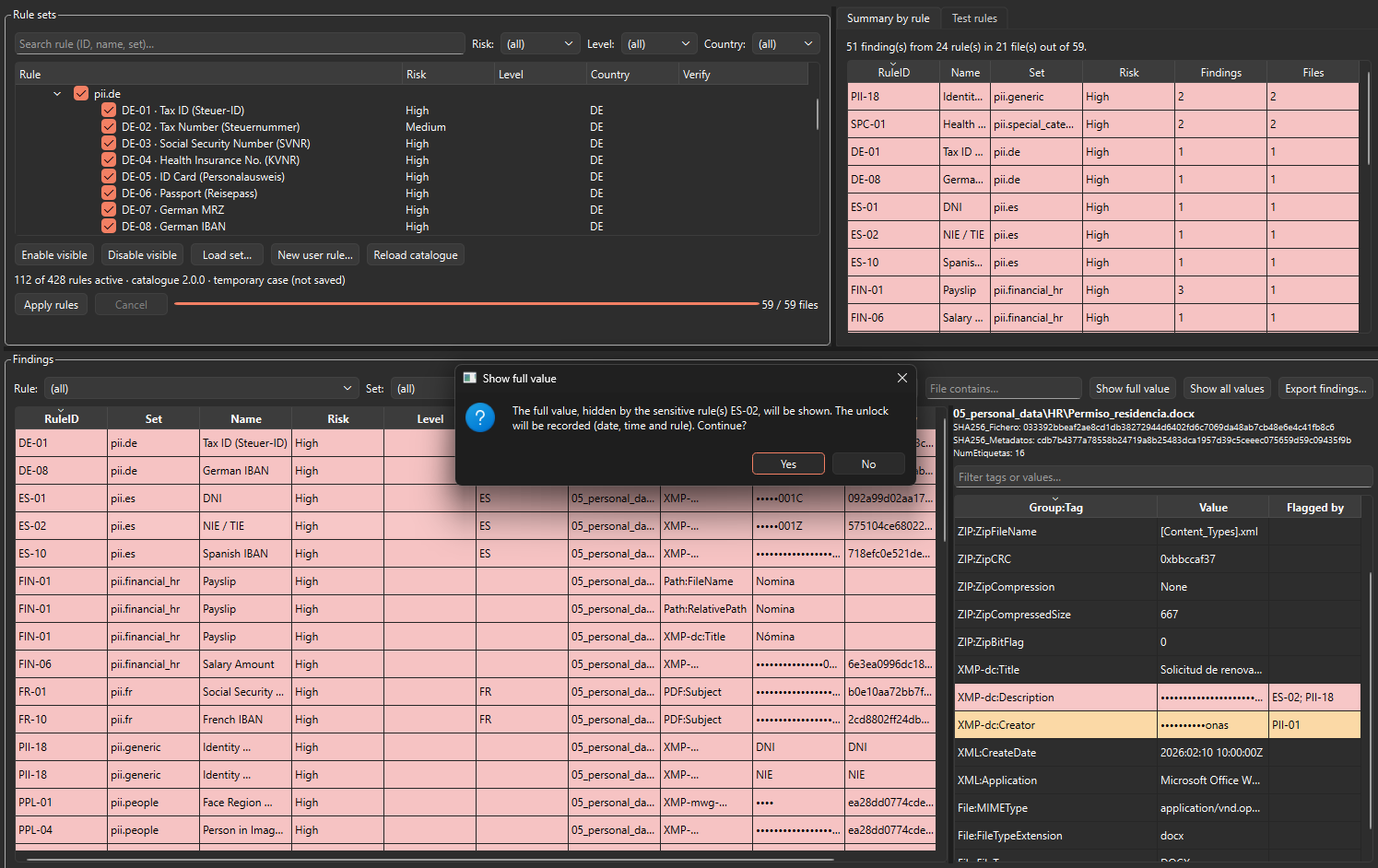 Figure 10: The findings table. Unlocking a masked value is confirmed and logged.
Views that show raw metadata at the examiner’s explicit request, such as grouping by a tag value or the timeline, are not masked.
Rule tester and your own rules
The Test rules sub-tab, next to Summary by rule, takes a sample value, a tag name and a file name. It shows which rules match and the matched text, which validators pass or fail (including matches rejected by a validator), and the group key the value would produce. It is the quickest way to check why an identifier was or was not flagged, or to test a new rule before running it on a case.
There are two ways to add rules. New user rule… opens a simple editor: tag, operator, value, AND/OR. The resulting rules appear under User rules. For the full schema, write a JSON rule set following the format of the files in rulesets\ and load it with Load set…. Metadig validates every rule on loading: regular expressions, validators, group-by functions, context references and case values. It refuses a set with errors. Sets in the older Metadig v1 format are converted automatically. JSON files placed in the rulesets\ folder are loaded with the catalogue, and Reload catalogue re-reads them without restarting.
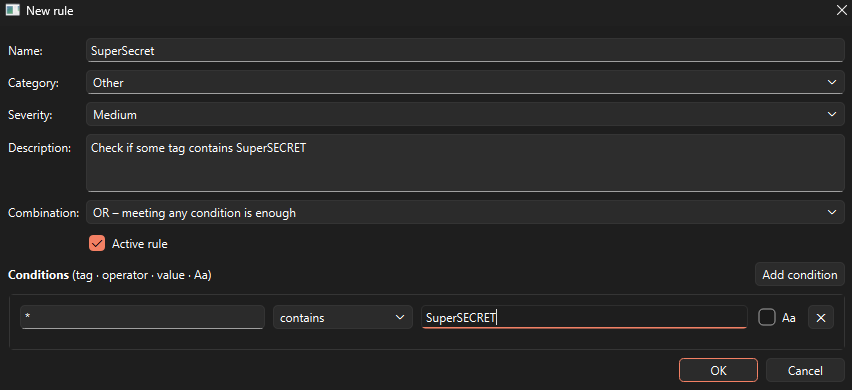 Figure 11: A user rule created with the built-in editor.
The catalogue itself is maintained as a YAML file in rulesets\source\ and converted to the per-set JSON files with tools\convert_catalog.py.
Exporting findings
Export findings… writes four files to a folder of your choice.
| File | Content |
|---|---|
hallazgos.csv | All findings, regardless of the table filters. Columns RuleID;Set;Name;Risk;Level;Country;File;Tag;Value(masked);GroupKey, followed by GroupKey2;Confidence;Context;Validators;Flags. Same CSV conventions as the extraction reports. |
reglas_aplicadas.json | Exact copy of the rules that were evaluated (active rules and their dependencies) and of the engine settings |
reglas_aplicadas.json.sha256 | SHA-256 of that file, in sha256sum format |
ejecucion_reglas.json | Provenance: catalogue version, active sets, ExifTool version and arguments of the extraction, UTC date of the analysis, case configuration values (never the HMAC key), classification marking and SHA-256 of the rules |
The rules snapshot and its hash let a reviewer establish exactly which rule definitions produced a given set of findings, even if the catalogue has changed since.
If any finding has a classification level of 1 or higher, Metadig first warns that the analysis and the exported files must be stored and handled on a system accredited for that level. It then proposes a marking based on the highest level found, such as NIVEL 3 — ES: RESERVADO. The marking can be edited or left empty. When accepted, it is written as the first line of hallazgos.csv (CLASIFICACIÓN: …) and recorded in ejecucion_reglas.json.
Good practices and limitations
False positives and context words. Identifier patterns are short, and metadata is full of numbers. Checksum validators remove most accidental matches; not_datetime and not_epoch reject timestamps that happen to fit a pattern. Where no checksum exists, rules rely on context words: a UK passport number needs “passport” nearby, and “Typhoon” needs military context. Rules without a check digit or context (for example DE-05, DE-06, ES-06, ES-07, FR-03 and UK-05) carry medium or low confidence, and their findings should be reviewed individually. The special_categories set is deliberately a set of low-precision triage signals, meant to be read together with an identifier found in the same file.
Validate tag names with real files. Rules marked Verify reference tag names that have to be confirmed against real files with exiftool -G1 -s before you rely on them. Vendor-specific tags vary between firmware and ExifTool versions.
Metadata only. Rules see what ExifTool reports and nothing else. Text in the body of a document, pixels in an image and frames in a video are not examined. Binary values are summarised, not extracted. MIP-10 needs a file inside the OOXML package that ExifTool does not report, and is shown as not evaluable. TMP-05 compares the time zone with the longitude because no country boundaries are available offline. TAM-07 only runs when the thumbnail dimensions are recorded. When ExifTool flattens face region lists that contain unnamed regions, names can no longer be matched to regions one to one. Absence of a finding is not evidence of absence: metadata is routinely stripped or rewritten.
Classified material. If there is any chance the evidence contains classified information, run Metadig on a system accredited for the highest level that may be present, and handle exports accordingly. The normalised levels support triage. They do not determine the classification of a document, which is the responsibility of the originator and the competent security authority.
GDPR and third-party data. Processing the personal data of third parties, including in metadata, requires a legal basis and must respect data minimisation and security. Use a saved case so that HMAC group keys are stable, unlock values only when needed (every unlock is logged), share the masked hallazgos.csv rather than the raw extraction where possible, and store caso.json with the same protection as the evidence.
Reproducibility. Record the ExifTool version with the case (it is in the log and in ejecucion.json), keep the rules snapshot and its hash with the findings, and keep the saved Messages log with your notes.
Conclusion
Metadig turns ExifTool’s per-file output into a case-level data set. Every file carries a content hash and a reproducible metadata hash, and files can be grouped by what they share and placed on a timeline of internal dates. A documented, versioned rule catalogue then highlights device links, editing traces, personal data, classification markings and export-controlled references. Findings are masked where they concern people, and are exported with the exact rules that produced them. Metadig is meant to support the examiner’s analysis and triage, not to replace it.
References
- ExifTool by Phil Harvey